
SAVING YOUR PERSONAL PC OPTIMUM OFFERS FOR NEXT WEEK
Load the PC Optimum app onto your phone.
PC Optimum is one of the best ways to save money and rack up points for free future shopping.
Every Wednesday, you can push forward four (4) personalized offers that you haven’t used, for the following week.
Personalized offers are offers for you to rack up points, and most of these offers are based on your personal shopping habits. This is Loblaws way of rewarding you for being a customer. They gear your offers to your preferred shopping products.
Saving them is a great way to use offers you still want, haven’t used, and hope to use for future purchases.
Personalized Offers look like this in your app.
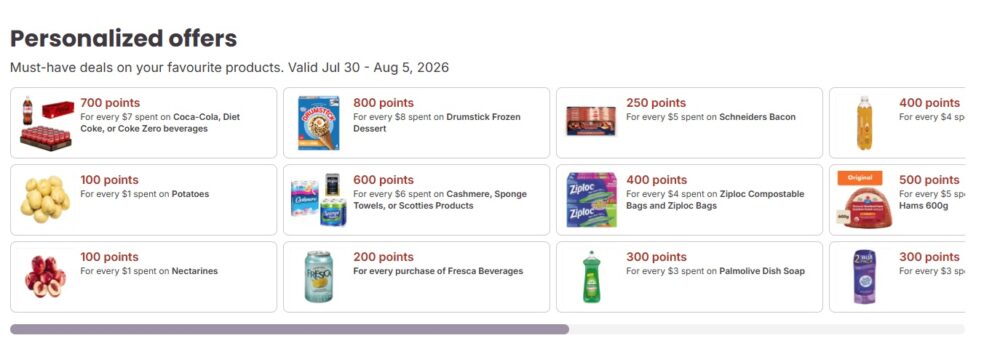
Personalized Offers and How to Save Them
Go through your personal offers on the PC Optimum app, and decide which ones you want to keep. They should be products you’ll buy and want to earn points and savings for.
You can keep up to 4. Each Thursday new offers will be added, but the ones you chose to keep will show up for the week as well.
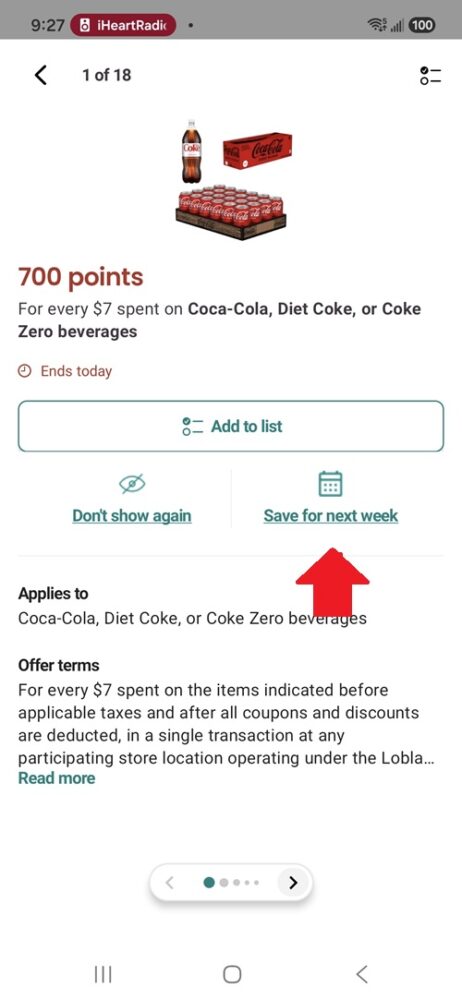
Tap on the offer, and then it opens a new box detailing that offer. Click on the green writing below the offer that shows: Save for Next Week!
It will automatically save it and show up on the new flyer start date.